(3 months ago) · Ciprian Rarau · Operating · 8 min read
Company Docs: The DNA of Every Business I Touch
For every company I work with, the first thing I build is a central knowledge base that becomes the DNA of the business. LLMs finally make this possible.
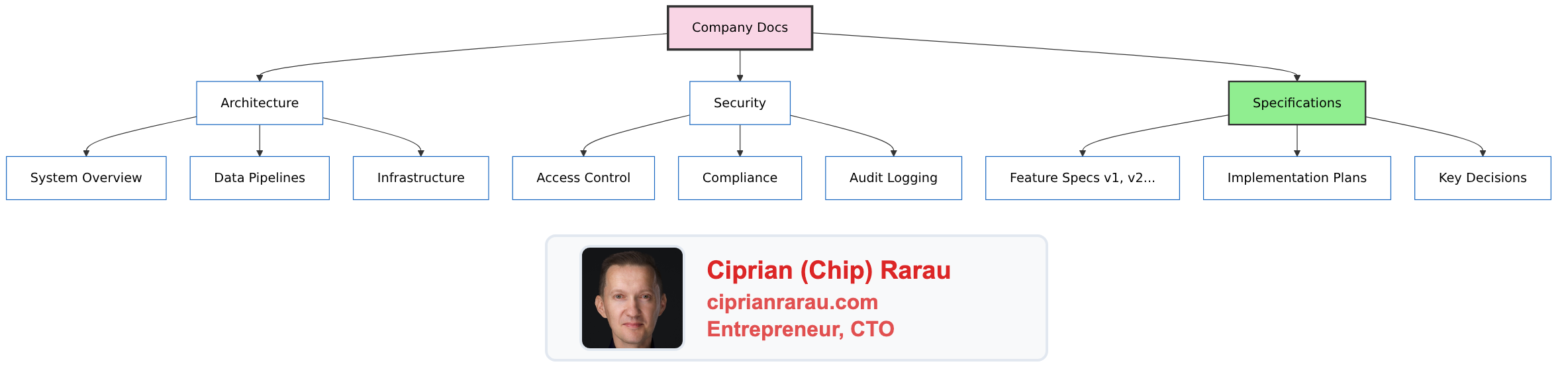
The First Thing I Build
When I walk into a company as a fractional CTO, the first question I ask is not about the tech stack. It’s “where does your institutional knowledge live?” The answer is almost always silence, or a half-maintained Notion workspace that nobody trusts.
I’ve seen what happens without it. A senior developer leaves, and three months of context walks out the door. A new hire spends two weeks asking questions that could have been answered in five minutes. An AI assistant hallucinates because it has no context about how the system actually works.
So the first thing I create isn’t a feature or a fix. It’s a documentation site. Every single time.
/projects/healthcare-startup/docs/
/projects/saas-platform/docs/
/projects/mobile-app-company/docs/
Each of these contains the DNA of the business. Not just what the product does - the complete knowledge graph of everything that makes the company work.
What Goes Inside
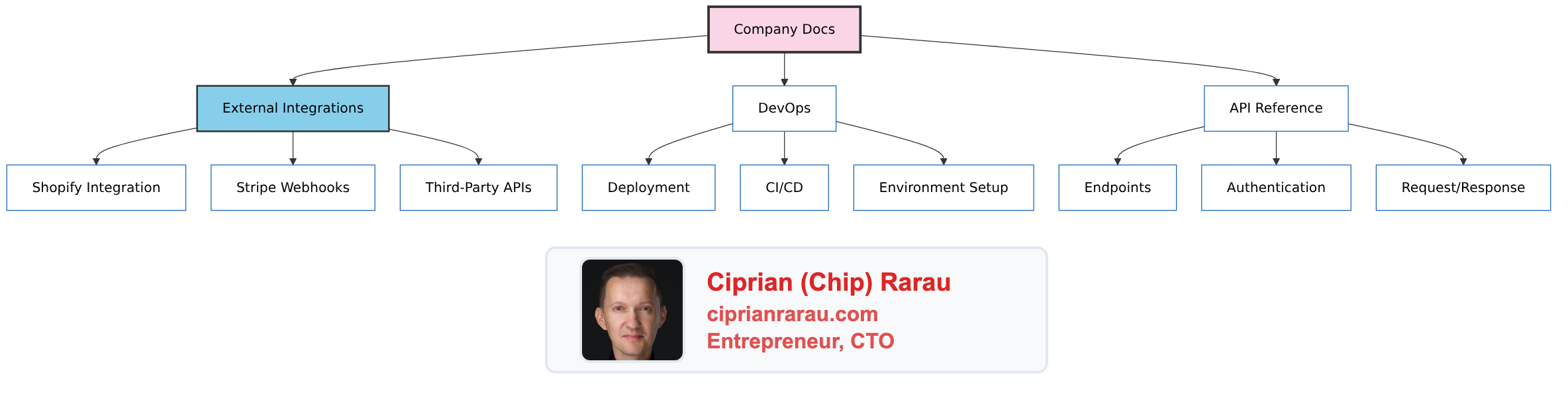
The documentation covers:
| Category | Examples |
|---|---|
| Architecture | System overview, data flows, service dependencies |
| Security | Access control, compliance (SOC 2, HIPAA), audit logging |
| Specifications | Feature specs (versioned), implementation plans, key decisions |
| External Integrations | Shopify, Stripe, Firebase, third-party APIs |
| DevOps | Deployment guides, CI/CD pipelines, environment setup |
| API Reference | Endpoints, request/response formats, authentication |
The Meta Repository Pattern
A company typically has multiple repositories:
company/
├── company-backend/      # API, business logic
├── company-web/          # Frontend application
├── company-mobile/       # React Native / iOS / Android
├── company-devops/       # Terraform, CI/CD, infrastructure
├── company-kpi/          # Analytics, dashboards
└── company-docs/         # THE GLUE - links everything
The docs repository is the meta layer. It doesn’t contain code - it contains understanding. It’s where everything connects.
Deployed Like Any Other Service
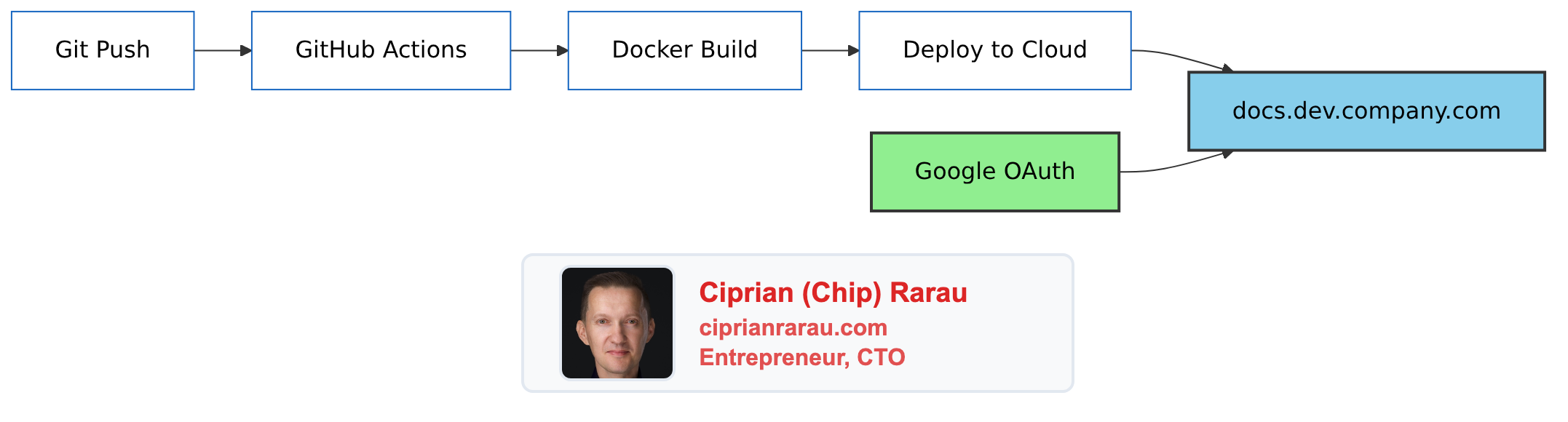
The documentation site deploys through CI/CD just like any other service:
- Framework: Docusaurus (React-based, MDX support)
- Authentication: Google OAuth with company domain restriction
- Container: Docker image with Nginx
- Deployment: AWS, Azure, or GCP - wherever the company lives
- Domain:
docs.dev.company.com(internal, not public)
Because I manage DevOps for these companies, spinning up another service is trivial. Same Terraform patterns, same CI/CD pipelines, same monitoring. The docs site is a first-class citizen.
Why the Dev Domain?
I deploy to the dev subdomain because:
- Internal by design - Not for customers, for the team and AI
- Environment parity - Dev domain already has auth configured
- Easy access - Developers know where to look
- Secure - Google OAuth means only company accounts can access
The Two Consumers
Humans (Sporadic)
Developers don’t read documentation constantly. They read it when they need it:
- Onboarding to a new service
- Investigating a production issue
- Understanding why a decision was made
- Setting up a new environment
When they need it, they know where to look. That’s enough.
AI (Constant)
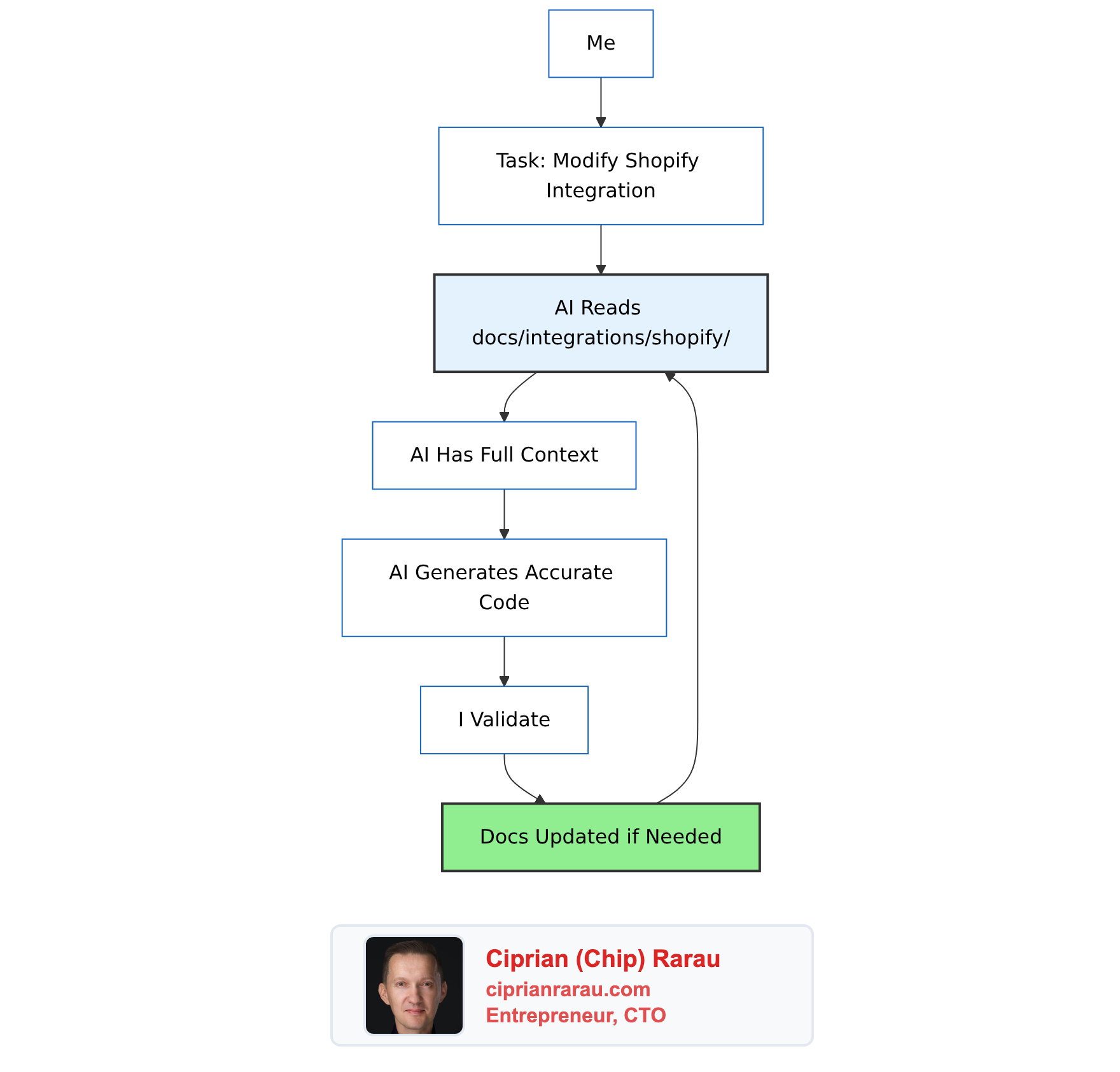
This is where it gets powerful. When I work with Claude Code or any AI assistant:
“I know there’s documentation on how the Shopify integration works. Read everything in the docs about Shopify, then let’s modify the webhook handler.”
The AI consumes the docs as context. Every time. The documentation becomes a knowledge amplifier.
Why This Works Now
Here’s the key insight: we tried this before. It never worked.
The amount of text, code examples, and architectural diagrams required to keep documentation useful was always too expensive. By the time you finished writing docs, the code had changed. Documentation was perpetually out of date.
What Changed
LLMs changed the economics of documentation:
| Before LLMs | After LLMs |
|---|---|
| Writing docs: slow, tedious | Writing docs: AI assists, fast |
| Reading docs: humans only | Reading docs: AI + humans |
| Updating docs: afterthought | Updating docs: part of the workflow |
| ROI of docs: low | ROI of docs: very high |
Documentation is no longer just for humans to read occasionally. It’s context for AI to use constantly. The ROI flipped.
The Dual Purpose
Documentation now serves two functions:
- Reflection - Capturing what was done, why decisions were made, how systems work
- Context - Providing AI with the knowledge to assist effectively
Both functions reinforce each other. When I write for AI context, humans benefit. When I write for human understanding, AI can use it.
Why Not Notion?
I used to use Notion for company documentation. It didn’t work.
The problem: Notion makes it very difficult to track changes and who did what. When documentation lives in Notion:
- Changes happen silently
- No review process before updates go live
- No way to see the full history of a decision
- No accountability for who changed what and when
With Git-based documentation (Docusaurus + markdown):
| Notion | Git-Based Docs |
|---|---|
| Changes are immediate, no review | Pull requests require approval |
| History is opaque | Full commit history with diffs |
| ”Who changed this?” is hard to answer | Every change attributed to a person |
| Documentation lives outside the codebase | Documentation IS part of the codebase |
| No branching for experimental changes | Branch, experiment, merge or discard |
The pull request workflow for documentation is powerful:
- Someone proposes a change to the architecture docs
- The team reviews it
- Discussion happens in comments
- Change is approved and merged
- Full audit trail preserved
Documentation becomes a first-class citizen of the development process, not a separate silo that drifts out of sync.
Mermaid Diagrams: Visual Thinking at Scale
Humans are visual. Complex systems become understandable when you can see them.
I built Mermaid diagrams by hand before LLMs. They were helpful, but tedious. Getting the syntax right, positioning elements, styling - it took time. So I only created diagrams when absolutely necessary.
Now? I can visualize complex scenarios in seconds:
Me: "Show me a diagram of how the authentication flow works
     with the SSO provider, including error cases"

AI: [Generates complete Mermaid diagram]
The economics changed completely:
| Before LLMs | After LLMs |
|---|---|
| Diagram creation: 30-60 minutes | Diagram creation: 30 seconds |
| Only for critical flows | For any concept worth visualizing |
| Static, rarely updated | Regenerated as systems evolve |
| One monolithic diagram | Split into multiple focused diagrams |
The ability to split complex scenarios into multiple diagrams is particularly valuable. Instead of one overwhelming diagram showing everything, I create:
- High-level system overview
- Detailed flow for each subsystem
- Error handling paths
- Data flow diagrams
Each diagram tells one story clearly. Together, they document the entire system visually.
This blog uses Mermaid extensively. Every diagram you see is generated from text in the markdown files, versioned in Git, and regenerated when the description changes.
The Spec Connection
This ties directly to my specs-as-single-source-of-truth workflow. Specs live in the docs:
docs/
├── specs/
│   ├── segments/
│   │   ├── index.md
│   │   ├── v1-original.md
│   │   └── v2-comprehensive.md
│   └── billing/
│       ├── index.md
│       └── v1.md
├── architecture/
├── security/
└── integrations/
Specs drive code generation. Code changes drive spec updates. The docs site is where this loop lives.
Git History as Audit Trail
Everything is in Git. Every change to documentation is:
- Timestamped
- Attributed
- Reviewable
- Revertible
When a spec evolves from v1 to v2, the history shows exactly what changed and why. This isn’t just documentation - it’s institutional memory.
The Setup
Docusaurus Configuration
// docusaurus.config.ts
const config: Config = {
  title: 'Company Docs',
  tagline: 'Internal Documentation',
  url: 'https://docs.dev.company.com',

  themeConfig: {
    navbar: {
      items: [
        { to: '/docs/architecture', label: 'Architecture' },
        { to: '/docs/specs', label: 'Specifications' },
        { to: '/docs/security', label: 'Security' },
        { to: '/docs/devops', label: 'DevOps' },
      ],
    },
  },
};
Google OAuth
# setup-google-oauth.md
1. Create OAuth credentials in Google Cloud Console
2. Set authorized redirect URI to docs.dev.company.com/callback
3. Restrict to company domain in OAuth consent screen
4. Configure nginx with oauth2-proxy
Docker Deployment
FROM node:20 AS builder
WORKDIR /app
COPY . .
RUN npm ci && npm run build

FROM nginx:alpine
COPY --from=builder /app/build /usr/share/nginx/html
COPY nginx.conf /etc/nginx/nginx.conf
What This Enables
With company docs in place:
- Faster onboarding - New developers read docs, ask AI questions about the codebase
- Safer changes - AI understands the system before suggesting modifications
- Decision archaeology - “Why did we build it this way?” is always answerable
- Cross-repo coherence - Even with 10 repositories, there’s one source of truth
- Compliance evidence - Security documentation already written for auditors
The Pattern Across Companies
I’ve deployed this pattern at multiple startups:
- A healthcare platform - HIPAA compliance docs, ML pipeline architecture
- A B2B SaaS company - SOC 2 preparation, feature specs, audit logging
- A mobile-first startup - External integrations (Firebase, Monday.com, Stripe) documented
Same Docusaurus setup, same Docker deployment, same Google OAuth. Different content, same infrastructure.
The Insight
The documentation site is the DNA of the business because:
- It persists even when code changes
- It captures the why not just the what
- It enables AI to understand the whole system
- It creates institutional knowledge that survives team changes
Every company I work with gets one. Not because it’s nice to have - because in the age of AI, it’s the foundation everything else builds on.
The age of AI finally made comprehensive documentation economically viable. Every company I work with gets one. Not because it’s nice to have, but because without it, you’re asking both humans and AI to operate without memory.