(1 month ago) · Ciprian Rarau · Technology  · 11 min read

App Store Connect Webhooks: Automated Release Notes with Git Tags

How I connected Apple's App Store Connect webhooks to Slack, with automatic commit tracking between releases and forced auto-upgrades for internal TestFlight users. Build uploaded? Here's what changed, and your app will update itself.

How I connected Apple's App Store Connect webhooks to Slack, with automatic commit tracking between releases and forced auto-upgrades for internal TestFlight users. Build uploaded? Here's what changed, and your app will update itself.

The Problem

iOS build and release lifecycle is opaque:

  1. Push code, trigger build
  2. Wait… is it processing?
  3. Check TestFlight manually
  4. Build ready? Who knows?
  5. Submit for review
  6. Wait… is it in review?
  7. Approved? Rejected? Check App Store Connect
  8. Released? Hope someone noticed

And when a build goes out: “What’s in this release?” requires digging through git history.

The Solution

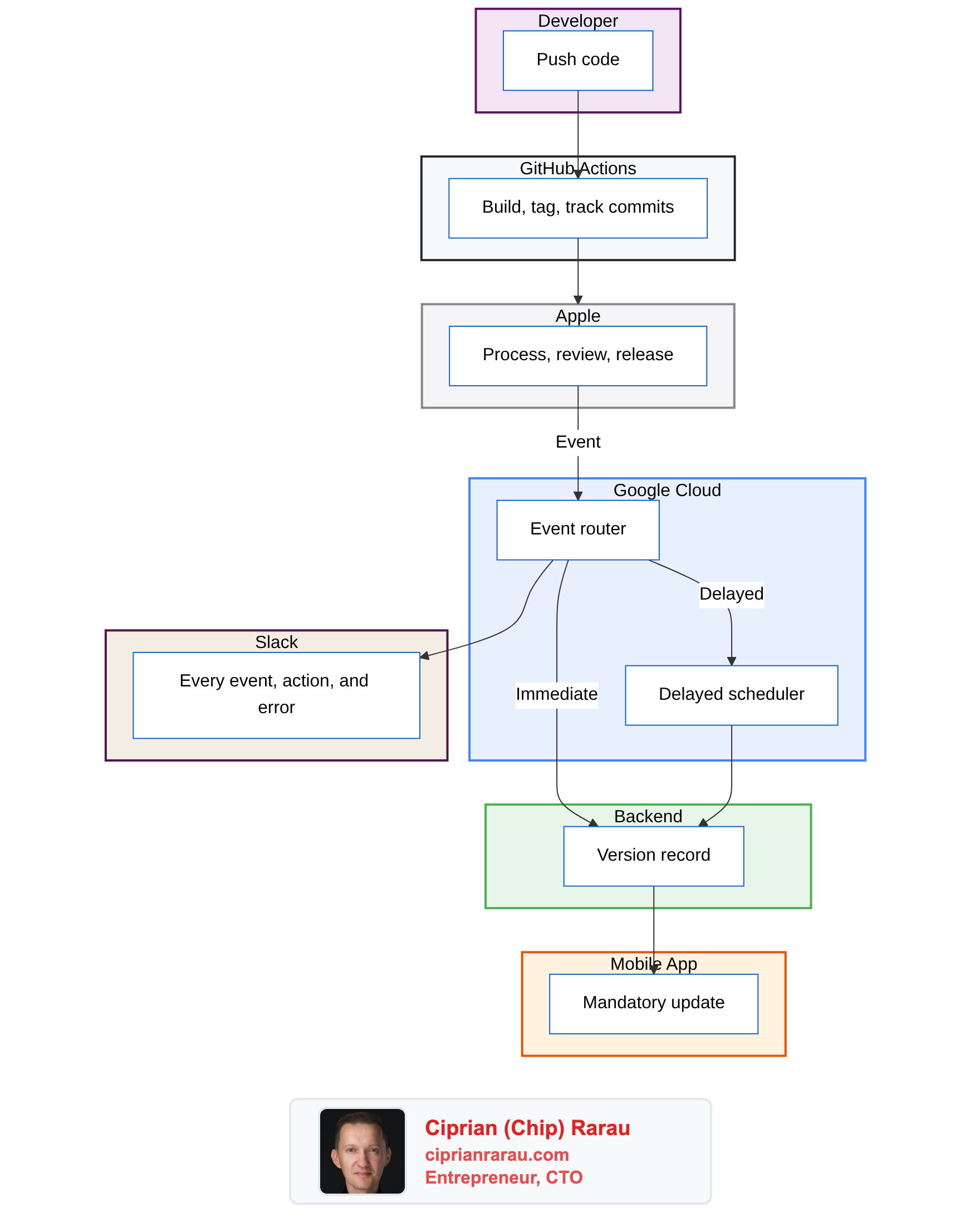
Apple sends webhooks. I listen.

Diagram 1

What Apple Sends

App Store Connect fires webhooks for:

Event TypeWhen It Fires
BUILD_UPLOAD_STATE_UPDATEDBuild processing (uploading, processing, valid, failed)
BUILD_BETA_DETAIL_EXTERNAL_BUILD_STATE_UPDATEDTestFlight status changes
APP_STORE_VERSION_APP_VERSION_STATE_UPDATEDReview submission, approval, rejection, release
BETA_FEEDBACK_CRASH_SUBMISSION_CREATEDTestFlight crash report from tester
BETA_FEEDBACK_SCREENSHOT_SUBMISSION_CREATEDTestFlight screenshot feedback

The Cloud Function

Webhook Handler

@functions_framework.http
def handle_webhook(request: Request):
    """Entry point for App Store Connect webhooks."""

    # 1. Verify Apple's signature
    secret = get_secret("appstore-webhook-secret")
    if not verify_apple_signature(request, secret):
        return "Unauthorized", 401

    # 2. Parse the webhook payload
    data = request.get_json()
    event_type = data.get("eventType")
    app_id = extract_app_id(data)

    # 3. Route to appropriate handler
    if "BUILD" in event_type:
        handle_build_event(data, app_id)
    elif "APP_STORE_VERSION" in event_type:
        handle_app_store_event(data, app_id)
    elif "FEEDBACK" in event_type:
        handle_feedback_event(data, app_id)

    # 4. Always return 200 (prevent Apple retries)
    return "OK", 200

Signature Verification

Apple signs webhooks with HMAC-SHA256:

def verify_apple_signature(request: Request, secret: str) -> bool:
    """Verify the HMAC-SHA256 signature from Apple."""
    signature_header = request.headers.get("X-Apple-Signature")
    if not signature_header:
        return False

    # Apple sends: "hmacsha256=<hex>"
    signature = signature_header.replace("hmacsha256=", "")

    # Calculate expected signature
    expected = hmac.new(
        secret.encode("utf-8"),
        request.get_data(),  # Raw request body
        hashlib.sha256
    ).hexdigest()

    # Constant-time comparison (prevents timing attacks)
    return hmac.compare_digest(signature.lower(), expected.lower())

Fetching Build Details

The webhook payload contains IDs, not details. I fetch the actual version/build from Apple’s API:

def fetch_build_details(build_upload_id: str) -> dict:
    """Fetch build details from App Store Connect API."""
    token = generate_jwt_token()  # ES256 JWT, 20-minute expiry

    # 1. Get buildUpload to find the build ID
    response = requests.get(
        f"{API_BASE_URL}/buildUploads/{build_upload_id}",
        headers={"Authorization": f"Bearer {token}"},
        params={"include": "build"}
    )

    build_id = response.json()["data"]["relationships"]["build"]["data"]["id"]

    # 2. Get the build with version info
    build_response = requests.get(
        f"{API_BASE_URL}/builds/{build_id}",
        headers={"Authorization": f"Bearer {token}"},
        params={"include": "app,preReleaseVersion"}
    )

    data = build_response.json()
    return {
        "version": data["included"][1]["attributes"]["version"],  # 1.2.3
        "build_number": data["data"]["attributes"]["version"],    # 235
        "app_name": APP_NAMES.get(app_id, "Unknown App"),
    }

The Git Tag Strategy

Here’s where it gets interesting. Every build creates a git tag:

build/prod/235
build/prod/236
build/staging/124
build/staging/125

The tag pattern: build/{environment}/{build_number}

GitHub Actions Workflow

# .github/workflows/ios-build.yml

- name: Create build tag and collect commits
  run: |
    # Find previous build tag for this environment
    PREV_TAG=$(git tag -l "build/${{ inputs.lane }}/*" --sort=-v:refname | head -1)

    # Get commits since last build
    if [ -n "$PREV_TAG" ]; then
      COMMITS=$(git log --pretty=format:"%h %s" ${PREV_TAG}..HEAD | head -20)
    else
      COMMITS=$(git log --pretty=format:"%h %s" -10)
    fi

    # Create JSON payload
    cat > commits.json << EOF
    {
      "build_number": "$BUILD_NUMBER",
      "environment": "${{ inputs.lane }}",
      "app_id": "$APP_ID",
      "commit_sha": "${{ github.sha }}",
      "branch": "${{ github.ref_name }}",
      "commits": $(echo "$COMMITS" | jq -R -s -c 'split("\n") | map(select(length > 0))'),
      "timestamp": "$(date -u +%Y-%m-%dT%H:%M:%SZ)"
    }
    EOF

    # Upload to GCS
    gcloud storage cp commits.json \
      gs://my-project-prod-appstore-webhook-source/commits/${APP_ID}/${BUILD_NUMBER}.json

    # Create and push the tag
    git tag "build/${{ inputs.lane }}/${BUILD_NUMBER}"
    git push origin "build/${{ inputs.lane }}/${BUILD_NUMBER}"

What Gets Stored

{
  "build_number": "236",
  "environment": "prod",
  "app_id": "6471992170",
  "commit_sha": "abc123def456",
  "branch": "main",
  "commits": [
    "abc1234 Add dark mode toggle",
    "def5678 Fix login validation",
    "ghi9012 Update onboarding flow",
    "jkl3456 Refactor auth service"
  ],
  "timestamp": "2025-01-27T15:30:00Z"
}

Fetching Commits in the Webhook Handler

def fetch_commits_from_gcs(app_id: str, build_number: str) -> list:
    """Fetch commit messages from GCS for a specific build."""
    client = storage.Client()
    bucket = client.bucket("my-project-prod-appstore-webhook-source")
    blob = bucket.blob(f"commits/{app_id}/{build_number}.json")

    if blob.exists():
        content = blob.download_as_text()
        data = json.loads(content)
        return data.get("commits", [])

    return []

The Slack Messages

Build Completed

def format_build_message(build_info: dict, commits: list) -> dict:
    """Format Slack blocks for build notification."""
    blocks = [
        {
            "type": "header",
            "text": {
                "type": "plain_text",
                "text": f"✅ {build_info['app_name']} Build Ready",
                "emoji": True
            }
        },
        {
            "type": "section",
            "fields": [
                {"type": "mrkdwn", "text": f"*Version:*\n{build_info['version']}"},
                {"type": "mrkdwn", "text": f"*Build:*\n{build_info['build_number']}"}
            ]
        }
    ]

    # Add commits if available
    if commits:
        commit_text = "\n".join([f"• {c}" for c in commits[:10]])
        if len(commits) > 10:
            commit_text += f"\n_...and {len(commits) - 10} more_"

        blocks.append({
            "type": "section",
            "text": {
                "type": "mrkdwn",
                "text": f"*Commits in this build:*\n{commit_text}"
            }
        })

    # Add TestFlight button
    blocks.append({
        "type": "actions",
        "elements": [{
            "type": "button",
            "text": {"type": "plain_text", "text": "Open in TestFlight"},
            "url": f"itms-beta://beta.itunes.apple.com/v1/app/{build_info['app_id']}"
        }]
    })

    return {"blocks": blocks}

App Store Events

Different events get different formatting:

EventEmojiMessage
Submitted for Review📤“My App 1.2.3 submitted for review”
In Review👀“My App 1.2.3 is being reviewed”
Approved“My App 1.2.3 approved!”
Rejected“My App 1.2.3 rejected”
Released🚀“My App 1.2.3 is now live!”

Crash Reports

def format_feedback_message(data: dict) -> dict:
    """Format crash or screenshot feedback."""
    feedback_type = data.get("feedbackType", "feedback")

    if feedback_type == "crash":
        emoji = "⚠️"
        title = "TestFlight Crash Report"
    else:
        emoji = "📸"
        title = "TestFlight Screenshot Feedback"

    return {
        "blocks": [
            {
                "type": "header",
                "text": {"type": "plain_text", "text": f"{emoji} {title}"}
            },
            {
                "type": "section",
                "text": {
                    "type": "mrkdwn",
                    "text": f"New {feedback_type} from TestFlight user"
                }
            },
            {
                "type": "actions",
                "elements": [{
                    "type": "button",
                    "text": {"type": "plain_text", "text": "View in App Store Connect"},
                    "url": f"https://appstoreconnect.apple.com/apps/{app_id}/testflight"
                }]
            }
        ]
    }

Terraform Infrastructure

# Cloud Function
resource "google_cloudfunctions2_function" "appstore_webhook" {
  name     = "appstore-webhook-${var.environment}"
  location = var.region

  build_config {
    runtime     = "python312"
    entry_point = "handle_webhook"
    source {
      storage_source {
        bucket = google_storage_bucket.function_source.name
        object = google_storage_bucket_object.function_zip.name
      }
    }
  }

  service_config {
    max_instance_count = 10
    min_instance_count = 0
    available_memory   = "256Mi"
    timeout_seconds    = 60

    environment_variables = {
      GCP_PROJECT   = var.project_id
      ENVIRONMENT   = var.environment
      SLACK_CHANNEL = "alerts-ios-builds"
    }

    secret_environment_variables {
      key        = "WEBHOOK_SECRET"
      project_id = var.project_id
      secret     = google_secret_manager_secret.webhook_secret.secret_id
      version    = "latest"
    }
  }
}

# Storage for commits
resource "google_storage_bucket" "commits" {
  name     = "${var.project_id}-appstore-webhook-source"
  location = var.region

  lifecycle_rule {
    condition {
      age = 90  # Keep commits for 90 days
    }
    action {
      type = "Delete"
    }
  }
}

Multi-App Support

Single webhook handler, multiple apps:

APP_NAMES = {
    "6471992170": "My App",     # Production
    "6747853426": "My App Stage",      # Staging
    "6747853441": "My App Dev",        # Development
    "6758223635": "My App Dev 2",      # Dev variant
}

def get_app_name(app_id: str) -> str:
    return APP_NAMES.get(app_id, f"Unknown App ({app_id})")

Each app has its own:

  • Build number sequence
  • Git tag namespace (build/prod/*, build/staging/*)
  • Commit history in GCS

Webhook Management Script

#!/usr/bin/env python3
"""Manage App Store Connect webhooks."""

import jwt
import time
import requests

EVENT_TYPES = [
    "BUILD_UPLOAD_STATE_UPDATED",
    "BUILD_BETA_DETAIL_EXTERNAL_BUILD_STATE_UPDATED",
    "APP_STORE_VERSION_APP_VERSION_STATE_UPDATED",
    "BETA_FEEDBACK_CRASH_SUBMISSION_CREATED",
    "BETA_FEEDBACK_SCREENSHOT_SUBMISSION_CREATED",
]

def generate_token(key_id: str, issuer_id: str, private_key: str) -> str:
    """Generate JWT for App Store Connect API."""
    now = int(time.time())
    payload = {
        "iss": issuer_id,
        "iat": now,
        "exp": now + 1200,  # 20 minutes
        "aud": "appstoreconnect-v1"
    }
    return jwt.encode(payload, private_key, algorithm="ES256", headers={"kid": key_id})

def create_webhook(app_id: str, url: str, secret: str):
    """Register webhook with Apple."""
    token = generate_token(KEY_ID, ISSUER_ID, PRIVATE_KEY)

    response = requests.post(
        "https://api.appstoreconnect.apple.com/v1/appWebhooks",
        headers={
            "Authorization": f"Bearer {token}",
            "Content-Type": "application/json"
        },
        json={
            "data": {
                "type": "appWebhooks",
                "attributes": {
                    "url": url,
                    "secret": secret,
                    "eventTypes": EVENT_TYPES
                },
                "relationships": {
                    "app": {
                        "data": {"type": "apps", "id": app_id}
                    }
                }
            }
        }
    )

    return response.json()

Testing

Simulate Webhooks Locally

#!/usr/bin/env python3
"""Simulate App Store Connect webhooks for testing."""

import hmac
import hashlib
import json
import requests

EVENTS = {
    "build_processing": {
        "eventType": "BUILD_UPLOAD_STATE_UPDATED",
        "data": {"state": "PROCESSING"}
    },
    "build_complete": {
        "eventType": "BUILD_UPLOAD_STATE_UPDATED",
        "data": {"state": "VALID"}
    },
    "review_submitted": {
        "eventType": "APP_STORE_VERSION_APP_VERSION_STATE_UPDATED",
        "data": {"state": "WAITING_FOR_REVIEW"}
    },
    # ... more events
}

def simulate(event_name: str, url: str, secret: str):
    """Send signed webhook to function."""
    payload = json.dumps(EVENTS[event_name])

    signature = hmac.new(
        secret.encode(),
        payload.encode(),
        hashlib.sha256
    ).hexdigest()

    response = requests.post(
        url,
        headers={
            "Content-Type": "application/json",
            "X-Apple-Signature": f"hmacsha256={signature}"
        },
        data=payload
    )

    print(f"Simulated {event_name}: {response.status_code}")

Usage

# Simulate build complete
python simulate_webhooks.py --event build_complete

# Simulate all events
python simulate_webhooks.py --all

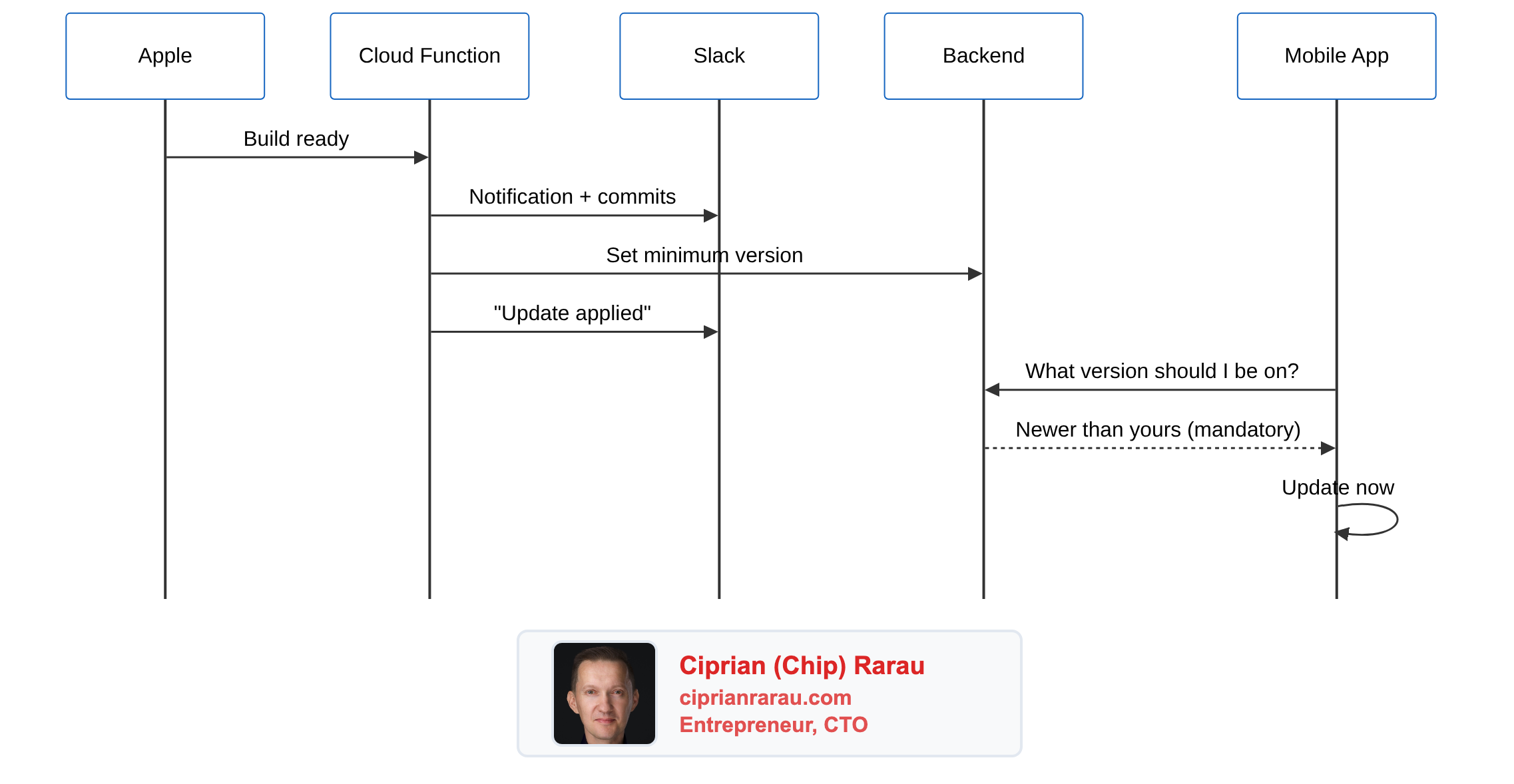
The Complete Flow

Diagram 2

The Auto-Upgrade: Closing the Loop

Notifications are nice. But there was still a gap. Someone from QA was testing on build 225 while the latest was 337. They had no idea they needed to update. Nobody told them. TestFlight doesn’t force updates.

So I connected the webhook to the backend.

The Idea

When a build finishes processing on TestFlight, the Cloud Function already knows the version and build number. What if it also told the backend? And what if the mobile app checked that on every launch?

Diagram 3

How It Works

The Cloud Function gained a few lines of code:

APP_BACKEND_CONFIG = {
    "6747853441": {"env": "dev", "url": "https://dev.eli-app.com"},
    "6747853426": {"env": "stage", "url": "https://staging.eli-app.com"},
    # Production is excluded - App Store handles that
}

def update_backend_app_version(app_id, version, build_number):
    config = APP_BACKEND_CONFIG.get(app_id)
    if not config:
        return  # Not a dev/staging app, skip

    secret = get_secret("app-version-webhook-secret")
    requests.post(
        f"{config['url']}/app-version/webhook",
        headers={"x-api-key": secret},
        json={
            "version": version,
            "buildNumber": build_number,
            "platform": "ios",
            "env": config["env"]
        }
    )

The backend stores the version as 1.4.17.338 (marketing version + build number) and marks it mandatory: true. The mobile app reads its actual build number at runtime using react-native-device-info (not from package.json, which turns out to be stale by the time the build is installed). On every app launch, it sends its full 4-segment version to the backend and gets back whether an update is required.

The Version Comparison Problem

Semantic versioning is usually 3 segments: 1.4.17. But in dev, the marketing version stays the same across dozens of builds. Build 225 and build 338 are both 1.4.17. The difference is only in the build number.

The fix: store 4-segment versions (1.4.17.338) and compare dynamically:

private compareVersions(latest: string, current: string): boolean {
  const latestParts = latest.split('.').map(s => parseInt(s, 10));
  const currentParts = current.split('.').map(s => parseInt(s, 10));
  const maxLength = Math.max(latestParts.length, currentParts.length);

  for (let i = 0; i < maxLength; i++) {
    const l = latestParts[i] || 0;
    const c = currentParts[i] || 0;
    if (l > c) return true;
    if (l < c) return false;
  }
  return false;
}

Missing segments default to 0, so 1.4.17 < 1.4.17.1. This handles mixed formats gracefully.

The Stale Build Number Gotcha

Here’s a fun one I didn’t expect. The mobile app was reading the build number from package.json:

// OLD - wrong
const buildNumber = packageJson.build[Platform.OS]; // "225" forever

Fastlane increments CURRENT_PROJECT_VERSION in the Xcode project during CI, but never touches package.json. So the app always thought it was build 225, no matter how many times it was updated.

The fix: read the native bundle version at runtime:

// NEW - correct
import DeviceInfo from 'react-native-device-info';
const buildNumber = DeviceInfo.getBuildNumber(); // "338" from CFBundleVersion

This reads CFBundleVersion directly from the installed binary. No stale values.

The Result

A full round trip, completely automated:

  1. Developer pushes code
  2. GitHub Actions builds and uploads to TestFlight
  3. Apple processes the build
  4. Apple fires webhook to Cloud Function
  5. Cloud Function notifies Slack AND updates the backend
  6. QA opens the app, sees “New version available”, taps update
  7. TestFlight installs the latest build

No manual database updates. No Slack messages saying “hey, new build is up, please update.” No one testing on a build from three weeks ago. The system enforces currency.

This is particularly powerful for internal dev and staging builds where you want everyone on the same page. Production still goes through the App Store review process, which has its own update mechanisms.

The Philosophy

Release transparency is a feature. The team should know:

  1. When builds are ready - Not “check TestFlight periodically”
  2. What’s in each build - Not “dig through git log”
  3. Where releases are in the pipeline - Not “check App Store Connect”
  4. When things go wrong - Crashes, rejections, failures
  5. That they’re on the latest build - Not “are you sure you updated?”

All of this arrives in Slack. The iOS build channel becomes the source of truth for release status. And the auto-upgrade mechanism ensures nobody is testing on stale builds.

The git tag strategy means I can always answer “what changed between build 235 and 236?” without leaving the terminal:

git log build/prod/235..build/prod/236 --oneline

And when the Slack notification arrives with those commits already listed, the team doesn’t even need to ask.

The full pipeline, from push to forced update on the tester’s device, runs without any human intervention. That’s the dream: developers write code, and the system handles everything else.

Enjoyed this post?

Get notified when I publish new articles on tech, startups, and building products.

Back to Blog

Related Posts

View All Posts »